
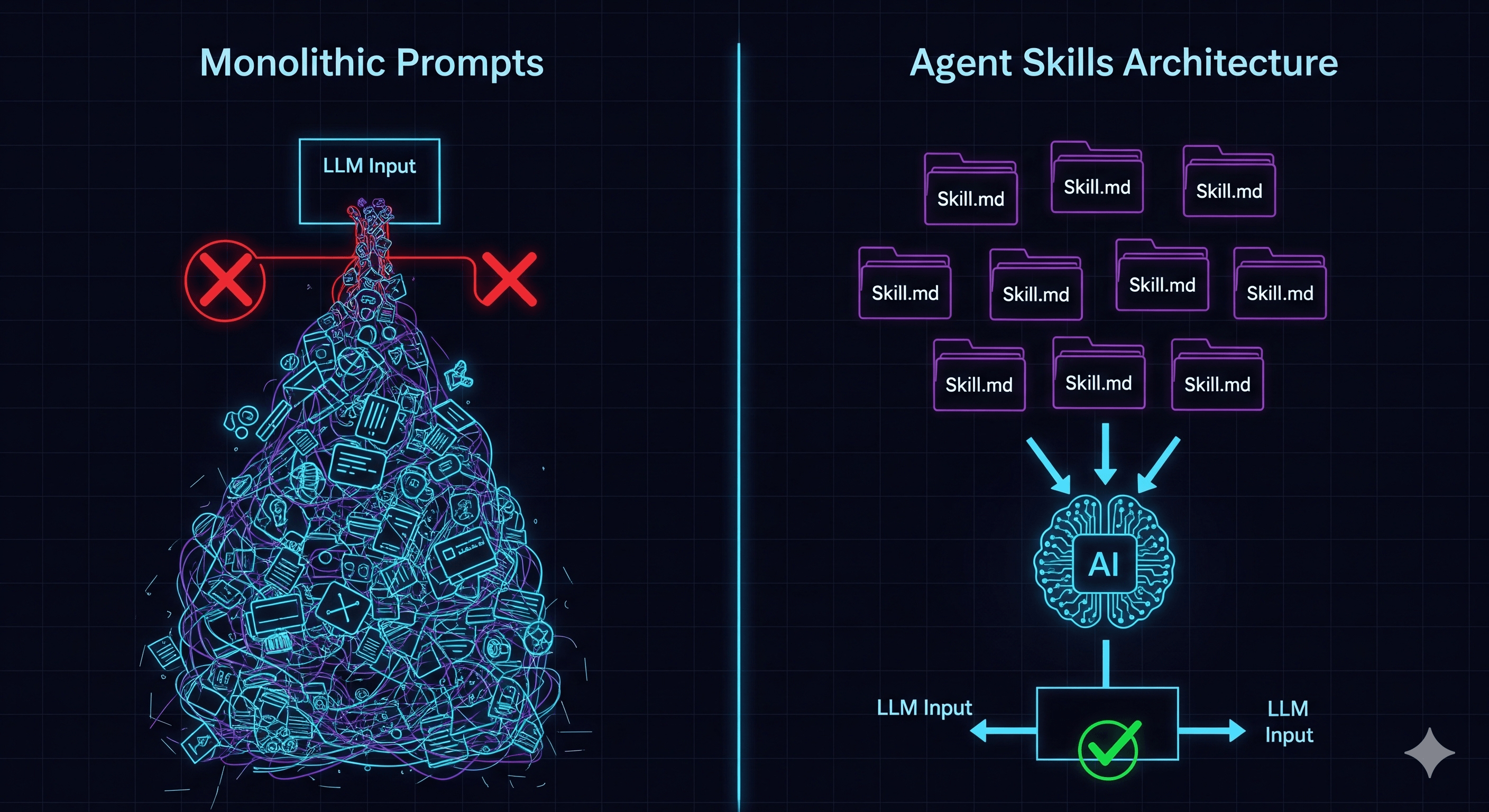
What is Agent Skills about?
I recently watched a video by ByteByteAI (ByteByteGo) titled “What Are Agent Skills Really About?”, and it finally clicked for me.
If you’ve played with building AI agents, you’ve probably hit the “Context Wall.” You start with a simple system prompt. Then you add some rules. Then a few function definitions. Then a style guide. Suddenly, your prompt is 4,000 tokens long, the model is forgetting half your instructions, and your API costs are skyrocketing.
We often think the solution is “larger context windows” (1M+ tokens), but the video argues that architecture, not raw context size, is the real solution.
Here is what I learned about Agent Skills and Progressive Disclosure, and why I think this is the future paradigm for reliable agents.
The Problem: The “Monolithic Prompt” Trap
We often treat LLMs like a magical intern who needs to know everything before starting day one. We stuff the context window with:
- Every possible tool definition
- The entire brand voice guidelines
- 50 different edge case rules
- The full database schema
Why this fails:
- Attention Drift (it’s proven, not just a feeling): Stanford researchers call this the “Lost in the Middle” problem. Their study showed that LLMs perform best with information at the beginning and end of the context window, but accuracy drops by over 30% for information placed in the middle. More instructions doesn’t mean better understanding—it often means worse understanding.
- Cost & Latency: Filling the context window with “dead code” (instructions not needed for the current task) is expensive and slows down generation.
- Fragility: A change in the “Email Style Guide” might accidentally break the “SQL Generation” logic because they share the same massive prompt space.
flowchart LR
    subgraph without["Without Skills"]
        direction TB
        wp["Prompt
─────────────
System Prompt
Tool #1 definition
Tool #2 definition
Tool #3 definition
Instruction #1
Instruction #2
Instruction #3
...
User Prompt"] --> wllm[LLM]
    end

    subgraph with["With Skills"]
        direction TB
        cp["Prompt
─────────────
System Prompt
Skills Index
User Prompt"] --> cllm[LLM]
        cllm -->|"load_skill"| skills
        skills["Skills
─────────────
Skill 1 · Skill 2 · ... · Skill K
(Tools + Instructions each)"] -.->|"on demand"| cp
    end
The Solution: Progressive Disclosure
The core idea is simple but powerful: Don’t give the agent the manual; give it the Table of Contents.
Instead of loading every instruction, the agent starts with a tiny Skill Index. This is just a list of names and one-line descriptions of what abilities are available (e.g., “Spreadsheet Audit”, “Email Drafter”, “SQL Query”).
When a task comes in, the agent looks at this index and thinks, “I don’t know how to audit a spreadsheet, but I see a skill named spreadsheet_audit. I’ll load that.”
Only then does the system inject the heavy instructions.
Anatomy of a Skill
The video defines a “Skill” not as a vague concept, but as a concrete folder structure. This appeals to my backend brain—it’s modularity applied to prompts.
A Skill typically consists of:
SKILL.md: The actual “Prompt” for this specific task. It contains the strict rules, guardrails, and “How-To” for this specific domain.- Scripts (e.g.,
audit.py): This is crucial. The video emphasizes that for deterministic logic (math, parsing, validation), we shouldn’t rely on the LLM. We should use code. The LLM just invokes the script. - Resources: Static files, templates, or schemas (like a JSON template for the output).
Aside: This is now an open standard. In December 2025, Anthropic released the Agent Skills specification as an open format. It’s not just a Claude thing anymore. OpenAI Codex, GitHub Copilot, VS Code, Cursor, and 20+ other platforms have adopted it. A skill you write once works across agents. The spec is tiny—you can read the whole thing in a few minutes.
Visualizing the Flow
I mapped out the flow to visualize how the context changes dynamically. It’s essentially “Lazy Loading” for prompts.
sequenceDiagram
    participant User
    participant Agent (Runtime)
    participant LLM
    participant SkillStore

    Note over LLM: Context: [Tiny Skill Index only]
    User->>Agent: "Audit this spreadsheet for me"
    Agent->>LLM: Forwards request
    LLM->>Agent: "I need to load 'Spreadsheet Audit' skill"
    Agent->>SkillStore: Fetch skill.md + scripts
    SkillStore->>Agent: Returns artifacts

    Note over Agent: Appends skill.md to Context
    Note over LLM: Context: [Index + FULL AUDIT RULES]

    Agent->>LLM: "Skill loaded. Proceed."
    LLM->>Agent: "Run audit.py on the file"
    Agent->>Agent: Executes Python Script (Deterministic)
    Agent->>LLM: Returns structured JSON result
    LLM->>User: "Here is the audit report..."
My Two Cents: Why This Matters
1. Moving from “Prompt Engineering” to “Software Engineering”
We are finally moving away from “Prompt Engineering” as a mystic art and towards “Software Engineering with AI components.” Separating the Index (Interface) from the Skill.md (Implementation) is exactly how we write good code.
It enables true S.O.L.I.D. principles for agents:
- Single Responsibility: The
spreadsheet_auditskill doesn’t truly care about theemail_writerskill. - Open/Closed: You can add new skills to the index without rewriting the core system prompt.
2. Code > LLM for Logic
The video highlighted that the skill includes scripts. This is a validation of the “Hybrid” approach. Don’t ask the LLM to calculate the sum of a column or parse a complex PDF. Ask it to write/run a script that does it. The Skill encapsulates both the understanding (LLM) and the execution (Code).
3. Portable Intelligence
If you structure skills as folders (Filesystem-based), they become portable. You can share a “GitHub Issue Triage” skill across different agents or projects. Now that it’s an open standard, this isn’t hypothetical—it’s how the ecosystem actually works.
flowchart BT
    skill["Skill X
(SKILL.md + Scripts + Resources)"]
    ta["Team A"] --> skill
    tb["Team B"] --> skill
    e1["Claude Code"] --> skill
    e2["GitHub Copilot"] --> skill
    e3["VS Code"] --> skill
    e4["Cursor"] --> skill
Try It Yourself: Build Your First Skill in 5 Minutes
Enough theory. Here is the minimum you need to create a working skill. You can try this with Claude Code, GitHub Copilot, or any agent that supports the standard.
Step 1: Create the folder
my-project/
└── .skills/
    └── code-reviewer/
        ├── SKILL.md
        └── scripts/
            └── check_complexity.py
Step 2: Write your SKILL.md
---
name: code-reviewer
description: Reviews pull request diffs for code smells, complexity, and naming issues.
---

## Instructions

You are a code reviewer. When the user asks you to review code or a PR diff:

1. First, run `scripts/check_complexity.py` on the changed files to get cyclomatic complexity scores.
2. Flag any function with complexity > 10.
3. Check for: unclear variable names, functions longer than 40 lines, missing error handling.
4. Output a markdown table with: File, Function, Issue, Severity (Low/Medium/High).

## Tone

Be direct but constructive. Suggest fixes, don't just complain.
Step 3: Add a helper script
# scripts/check_complexity.py
import ast
import sys

def get_complexity(filepath):
    """Count branches (if/for/while/except) per function as a simple complexity proxy."""
    with open(filepath) as f:
        tree = ast.parse(f.read())
    results = []
    for node in ast.walk(tree):
        if isinstance(node, (ast.FunctionDef, ast.AsyncFunctionDef)):
            branches = sum(1 for child in ast.walk(node)
                          if isinstance(child, (ast.If, ast.For, ast.While, ast.ExceptHandler)))
            results.append({"function": node.name, "line": node.lineno, "complexity": branches + 1})
    return results

if __name__ == "__main__":
    for filepath in sys.argv[1:]:
        for r in get_complexity(filepath):
            print(f"{filepath}:{r['line']} - {r['function']}() complexity={r['complexity']}")
That’s it. Three files. The agent sees only the name and description at startup (~20 tokens). When someone says “review this PR,” the agent loads the full SKILL.md and knows exactly what to do, including running real code for the parts that need determinism.
How Context Changes at Each Stage
| Stage | What’s in context | Token cost |
|---|---|---|
| Startup | "code-reviewer: Reviews pull request diffs..." | ~20 tokens |
| Skill activated | Full SKILL.md instructions | ~200 tokens |
| Script result loaded | Complexity report output | ~100 tokens |
Compare this to stuffing the same instructions into a system prompt permanently: you’d pay ~200 tokens on every single request, even when the user just wants to chat.
When You Don’t Need This
To be fair—not every agent needs skills. If your agent does one thing with 3-5 tools, a single system prompt works fine. The monolithic approach breaks down when:
- You have 10+ distinct capabilities in one agent
- Different tasks need conflicting instructions (formal email tone vs. casual chat)
- Your prompt is over 2,000 tokens and growing
If none of these apply, keep it simple. Skills are for when simplicity stops scaling.
Summary
The “Agent Skills” pattern isn’t new technology; it’s an architectural pattern. It acknowledges that LLMs are powerful reasoning engines but poor databases. By using Progressive Disclosure, we keep the reasoning engine focused, fast, and accurate.
If you are building agents today and hitting the context wall, try extracting just one capability from your system prompt into a skill folder this week. You’ll immediately feel the difference in focus and maintainability.
References: